Showing posts with label BUDGET AND CONTROL. Show all posts

Thursday, September 15, 2022

Budget in Tally ERP 9

Reference


 Company -> Accounts only

Financial year -> 1.4.--- to 31.3---

BUDGET:

The main purpose of budgeting is to control the expenditure. This is possible by creating budgets and comparing the budged figures against the actual figures. You can generate report based on view the variances or differences between the actual and budgeted figures.

Tally allows you to create multiple budgets. There could be budgets for specific purposes, e.g. for marketing

Budget Activation -> F11-> Accounting features

budget


Step 1

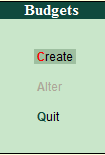
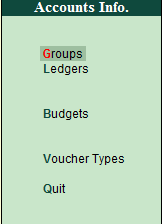
Gateway of tally -> Accounts info -> Budget -> Create
budget
budget
budget


Types of Budget:

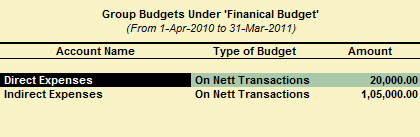
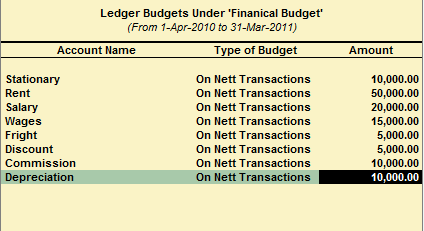
Under the types of budget a pop-up of two different kinds of budget appear, namely as follows.

On Closing Balance:

This is used for comparing the closing balance figures in the final statement.

On Nett Transaction:

This is used for comparing transactions against budget.
budget
budget
budget


How to display budget variances of budget?

Go to trial balance -> Then Alt + F2 change the period of budget -> Then Click F4 -> Select the group -> Then Alt + C -> Alt + B Budget variance.

BUDGET AND CONTROL

budget Refernce


The annual estimate of accounts is called Budget. It can be annual, six monthly, and tri monthly or monthly.

ESTIMATED VALUE

To activate budget and control, follow these steps:-

Path for activate budget and control:- G. O. T. (gateway of tally) --> press F11 (company features)--> press F1 (accounting features).


Now we create ledger in the company.
Path for ledger creation:- G. O. T. (gateway of tally) --> account info--> ledger--> create (multiple).


After ledger creation, we create budget as follow:-

Path for budget creation:- G. O. T. (gateway of tally) --> account info--> budget--> create.


Select “Budget” option from accounts info as follow:-

After that, select “create” option as follow:


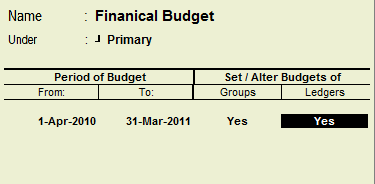
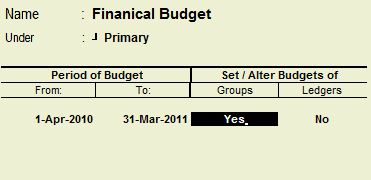
After this, budget creation form will be open as follow:


Fill this budget creation form as follow:


Now we shall do voucher entry:

Path for voucher creation:- G. O. T. (gateway of tally) --> accounting voucher--> press F5 (payment voucher).

To view report of budget and control, follow these steps:-

G. O. T. (gateway of tally)--> display--> trial balance


Press Alt + F2 to change period


Press Alt + B to view the report of budget and control


Now enter on this option and the report can be seen as follow:


Press "Alt + F1" for more details.